AliExpress Search Data in 2026: 200 Real Listings, Prices, Sold Counts and What to Clean Before You Trust Them
TL;DR
- We pulled 200 live AliExpress search results (5 queries x 40 rows, US storefront, USD) on Nov 9, 2026 with the AliExpress Scraper. Every row has a title, price, discount label, sold count, rating, Choice and ad flags and a product URL.
- 116 of the 200 rows (58%) showed exactly $1.09 as their price. If you average or take a median across a raw export, you learn about that flat price, not about the market. Set those rows aside and the median price per query ranged from $3.95 (phone case) to $14.51 (yoga mat).
- 198 of 200 rows carry a discount label (median 80% off), but only 56 rows show an original price higher than the sale price. Recompute discounts yourself from the two prices before you use them.
- Demand differs a lot by query. The median sold count was 937 for wireless earbuds and 8 for laptop stands. The single biggest listing shows 90K+ sold.
- 49 rows (24.5%) were promoted listings, and they were the proven sellers: median 2,000 sold versus 86 for organic rows.
- Cost at our listed price: $2.50 per 1,000 products plus $0.001 per run. This 200-row export is about $0.50.
Want to try it? Open the AliExpress Scraper. The form opens with a ready "phone case" search, so you can press Start and see a real result for about five cents.
If you sell online, dropship, or build product-research tools, AliExpress search results are one of the largest public price and demand signals there is. They show what is being listed, what shoppers are buying, and roughly what it costs to source. The catch is that a search results page is a messy source. Prices, discounts and sold counts are shown the way a marketplace wants to show them to a shopper, not the way an analyst wants to read them.
So instead of describing what an AliExpress export could look like, we ran one and read it critically. This guide covers what is in the data, where it surprised us, and the cleaning steps you should apply before you trust any number from it, whether it comes from our tool or anyone else's.
Disclosure: we build and maintain the AliExpress Scraper used in this guide.
Contents
- What we ran
- What each row contains
- The $1.09 problem
- Prices once the flat rows are set aside
- Discount labels versus actual prices
- How much demand is there?
- Promoted listings versus organic
- Choice badges and ratings
- What it costs
- Five things people use this data for
- A cleaning checklist
- Limits and good practice
- FAQ
What we ran
On Nov 9, 2026 (about 10 AM Pacific) we ran the AliExpress Scraper in search mode with five queries chosen to cover very different product types: wireless earbuds, phone case, led strip lights, yoga mat and laptop stand. We asked for the top 40 results of each, sorted by best match, shipped to the US and priced in USD. The run finished in well under a minute and returned exactly 200 rows, 40 per query.
Nothing was filtered afterward. Everything below is computed from those 200 rows, and the numbers are a snapshot of one moment: AliExpress prices, promotions and rankings change daily, so treat this as an example of what the data looks like, not as a market report.
What each row contains
Each result comes back as one row with these fields:
| Field | What it tells you |
|---|---|
title, url, productId, imageUrl |
What the product is and where to find it |
salePrice, originalPrice, currency |
The prices shown at scrape time |
discountPct |
The discount label shown on the listing |
soldText, soldCount |
The sold figure as displayed ("4K+ sold") and as a number (4,000) |
rating |
Star rating, when the listing shows one |
isChoice, isAd |
Whether the row has the Choice badge or is a promoted placement |
searchQuery, page, position |
Which search and where the product ranked |
scrapedAt |
The moment the row was collected |
Field completeness is typical of a search page. All 200 rows had a title, price and URL. 181 had a sold figure (19 had none), 149 had a rating (51 did not, usually newer or low-volume listings), and 198 had a discount label.
The $1.09 problem
The first thing that jumps out is the price column. Of the 200 rows, 116 had a sale price of exactly $1.09. It shows up in every query: 23 of 40 for wireless earbuds, 28 for phone case, 24 for led strip lights, 20 for yoga mat and 21 for laptop stands.
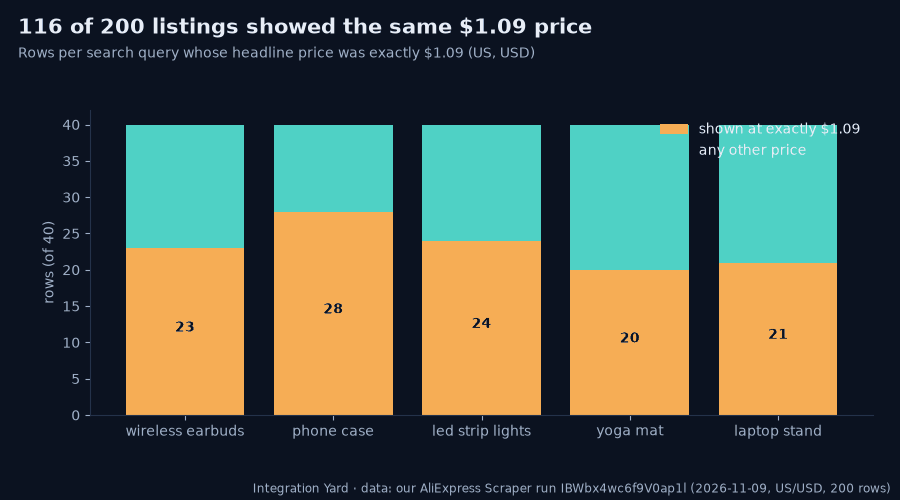
These are not 116 products that happen to cost the same. They are wireless earbuds with 90K+ sold next to phone cases next to laptop stands, all at one price. It looks like a promotional price shown to a shopper in this storefront context. We have not verified the exact mechanism, and you should not assume it is what you would pay at checkout for every item, variant or shipping option.
What matters for analysis is simple. If you take the median of the raw column, every query except yoga mat comes out at $1.09, and you would conclude AliExpress sells everything for about a dollar. That is a data-quality trap, not a market insight. Flag these rows in a separate column and compute market statistics without them, or confirm the real price on the product page with a product-mode run before you make a sourcing decision.
Prices once the flat rows are set aside
With the 116 flat rows removed, 84 rows remain: 17 for wireless earbuds, 12 for phone case, 16 for led strip lights, 20 for yoga mat and 19 for laptop stand. Medians per query:
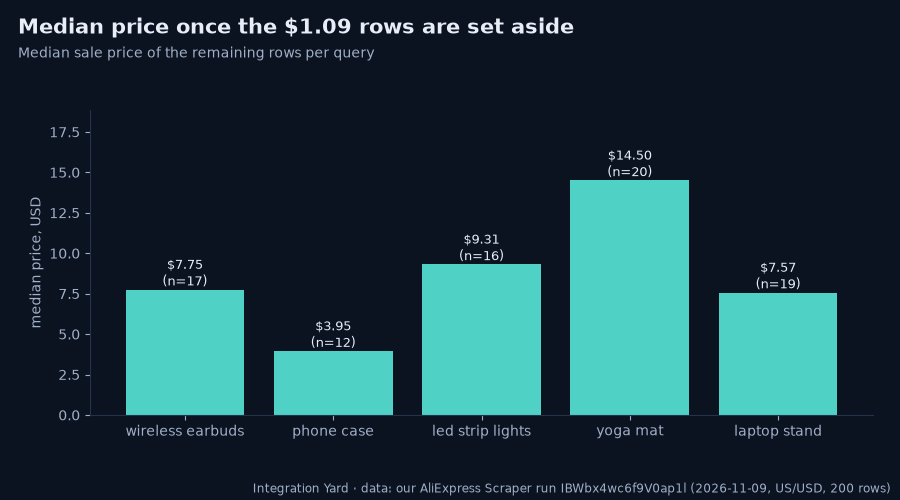
| Query | Rows left | Median price |
|---|---|---|
| phone case | 12 | $3.95 |
| laptop stand | 19 | $7.57 |
| wireless earbuds | 17 | $7.75 |
| led strip lights | 16 | $9.31 |
| yoga mat | 20 | $14.50 |
Two cautions. First, the sample per query is small (12 to 20 rows), so these medians are directional. Second, the ranges inside each query are wide. Phone cases in this sample went up to $43.29, earbuds to $81.77 and yoga mats to $351.29, so a median hides a long tail of premium or bundled listings. If you are pricing a product, look at the distribution, not one number, and read the titles of the outliers.
Discount labels versus actual prices
Almost everything on AliExpress is on sale. 198 of 200 rows carried a discount label and the median label was 80% off. Taken at face value that would make the whole marketplace a clearance sale.
The row data tells a more careful story. Only 56 rows show an original price that is higher than the sale price. In 142 rows the discount label is present while the original price equals the sale price, so the label cannot be recomputed from the two prices in the row. The label is what the page displays. It is not a figure you can verify from the numbers next to it.
For research this means: use salePrice for comparisons, use originalPrice only where it is genuinely higher, and do not treat discountPct as a measure of how much cheaper something is than usual. If you care about real price movement, the right method is repeated scrapes of the same products over time. The scraper's product mode has a changes-only option for that. It records a baseline and then returns only products whose price or stock changed, and it does not claim to know history it did not capture.
How much demand is there?
Sold counts are the most useful signal in a search export, because they tell you what shoppers actually buy. AliExpress shows them as rounded text such as "937 sold" or "4K+ sold", and the scraper gives you both the text and a number.
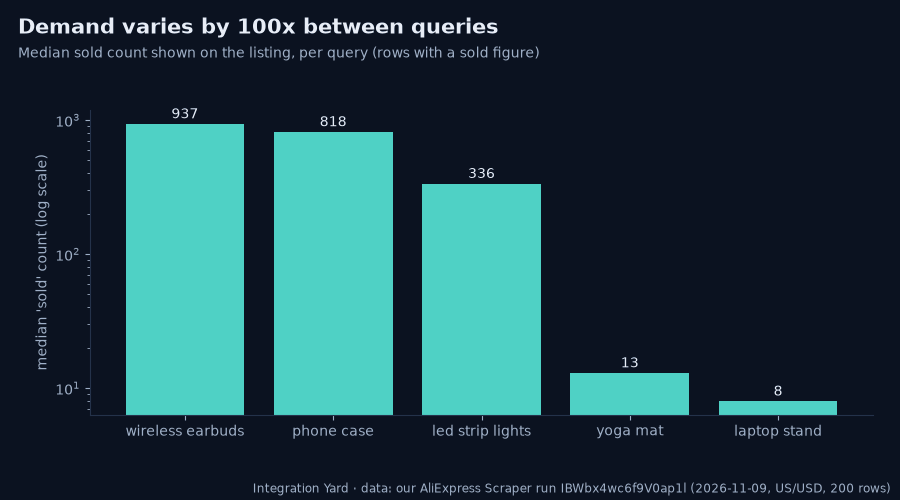
| Query | Median sold | Rows with a sold figure |
|---|---|---|
| wireless earbuds | 937 | 39 |
| phone case | 818 | 31 |
| led strip lights | 336 | 39 |
| yoga mat | 13 | 33 |
| laptop stand | 8 | 39 |
The gap is large: the typical top result for earbuds had sold roughly 100 times more units than the typical top result for laptop stands. Across all rows, 66 listings showed 1,000 or more sold and the biggest showed 90K+. Added together, the sold figures in the export come to about 573,000 units, though because the page rounds ("4K+") the true total is only approximately that.
Two practical points. A low median is not "bad", it may just be a niche where a few well-priced listings could stand out. And sold figures are lifetime counts, so an old listing can look strong while a newer product with fewer sales is actually growing. If a listing date is available on the page the scraper returns it, which lets you separate the two.
Promoted listings versus organic
Search pages mix organic results with paid placements. In this export 49 of 200 rows (24.5%) were flagged as promoted: 9 for wireless earbuds and 10 for each of the other four queries, which looks like a fixed number of ad slots per page.
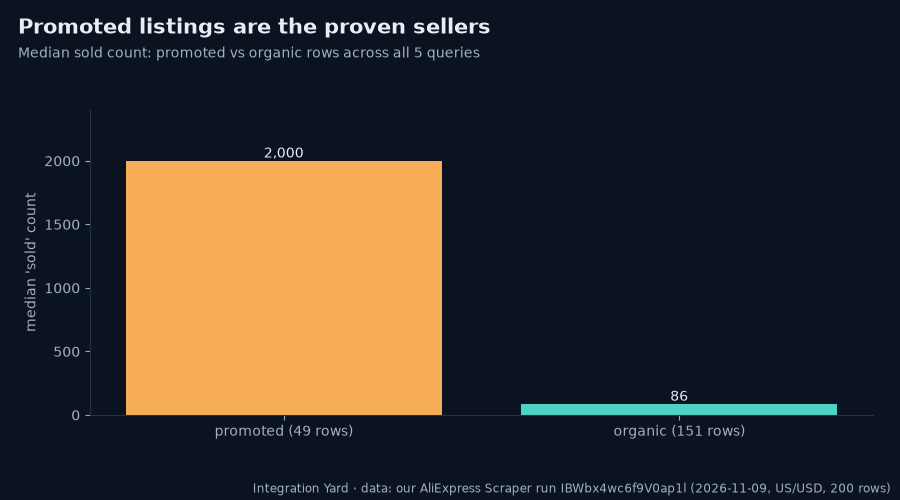
The sold counts differ sharply. Promoted rows had a median of 2,000 sold, organic rows 86. Ratings were the same for both groups, a median of 4.8. In other words, sellers are paying to promote products that already sell, which is what you would expect. For research, that is useful in two ways. The promoted rows are a quick list of proven products in a category. And if you want to understand organic ranking on its own, you should filter the promoted rows out, because they are placed by budget, not by relevance.
Choice badges and ratings
The Choice badge appeared on 145 of 200 rows (72.5%), ranging from 65% of rows (led strip lights, yoga mat) to 82.5% (laptop stand). Among rows that show a rating, 81% were rated 4.5 or higher, and the overall median was around 4.8.
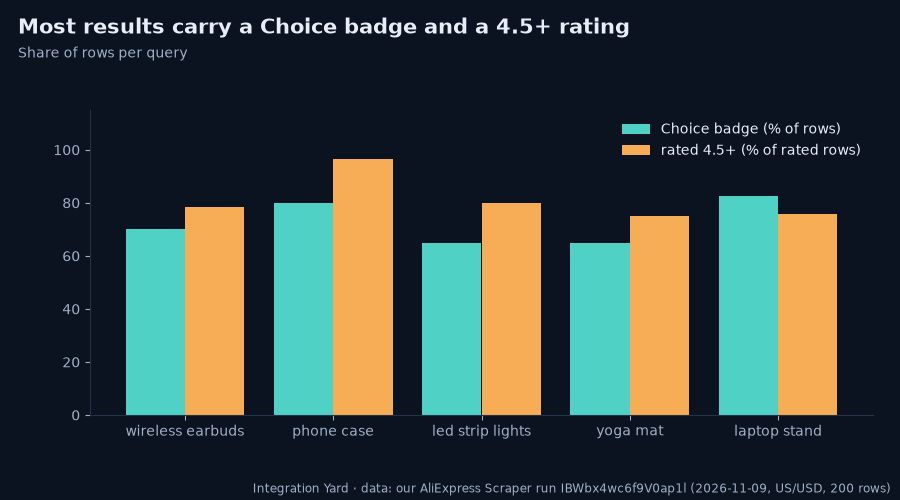
When most results are badged and highly rated, those signals stop separating the good from the average. They are still useful as a minimum bar, but the ranking inside the group depends on price, sold count and, for a serious sourcing decision, the product page itself: reviews, shipping time, seller history and variants. The scraper can return variants, per-variant price and stock, store details and shipping information when you turn on product details, at the same per-row price.
What it costs
At our listed price, the AliExpress Scraper costs $2.50 per 1,000 products and $0.001 per run on the Apify Free plan, with a little less on paid plans. The 200-row export in this guide is about $0.50. A five-row sample is about a cent. You can set a maximum charge per run, so a typo in the input cannot turn into a surprise bill. Rows that fail are not charged.
Apify's Free plan includes monthly platform credit, so a first trial like the one above typically costs nothing out of pocket.
Five things people use this data for
- Product research for dropshipping and private label. Sort by sold count, filter to non-promoted rows, then check price and rating.
- Sourcing price benchmarks. Compare the median price per category, with flat-price and promotional rows handled separately.
- Brand and marketplace monitoring. Track how many listings and which sellers appear for your brand name or key product terms.
- Category and trend snapshots. Run the same queries weekly and compare sold counts and the share of promoted slots.
- Feeding AI agents and dashboards. The output is structured JSON, CSV or Excel, and the scraper works through the Apify MCP server, so an assistant can run a search and read the rows directly.
A cleaning checklist
Run through this before you chart anything from a marketplace export:
- Flag repeated headline prices. If one value shows up across unrelated products, as $1.09 did here, exclude it from market statistics.
- Drop or tag promoted rows when you study organic ranking, and keep them when you want a list of proven sellers.
- Recompute discounts from
salePriceandoriginalPrice, and only where the original price is higher. - Treat sold counts as rounded lifetime figures, not monthly demand.
- Check missing values. 51 rows had no rating and 19 had no sold figure. Missing is not zero.
- Re-run to confirm. One snapshot is a sample. Two or three on different days tell you what is stable.
- Verify before you buy. For any product you intend to source, confirm price, shipping and variants on the product page.
Limits and good practice
- This is public search data, a point-in-time snapshot. The scraper does not return price history it never captured.
- Prices depend on the storefront context. This run used a US ship-to and USD. Another country or currency can give different prices and different results.
- AliExpress sometimes limits automated access to product detail pages. Search results were reliable in this run, while detail-level data can take longer or return fewer rows at busy times. Rows that cannot be collected are reported rather than charged.
- Use the data in line with AliExpress's terms and the laws that apply to you. Do not collect personal data, and do not use scraped content to impersonate sellers or copy their product pages.
- Our sample was five queries and 200 rows. It illustrates the data. It is not a representative study of AliExpress.
FAQ
How do I export AliExpress search results to CSV? Open the AliExpress Scraper, enter your search terms and a maximum number of results, press Start, then download the dataset as CSV, Excel or JSON when the run finishes. No AliExpress login, affiliate account or developer key is needed.
Why do so many AliExpress prices show as $1.09? In our Nov 9, 2026 run, 116 of 200 US search rows had exactly that price. It appears to be a promotional price displayed in that context. Exclude those rows from market statistics and check the real price on the product page before sourcing.
Can I get AliExpress product variants and stock? Yes. Turn on product details to add each variant's attributes, price and stock, plus store and shipping information. It is the same per-row price as a search row.
Does the scraper show price history? No. It returns the price at scrape time. To track change, schedule repeated runs on a fixed product list with the changes-only option, which returns only new, changed or removed products.
How accurate are the sold counts? They are the rounded lifetime figures AliExpress displays, such as "4K+ sold". They are good for comparing products against each other, not for measuring last month's demand.
How much does it cost to scrape AliExpress? $2.50 per 1,000 products plus $0.001 per run on the Apify Free plan, and a little less on paid plans. The 200-row export in this guide costs about $0.50.
Can an AI agent use this? Yes. The actor works through the Apify MCP server and can return compact output, so an assistant can run a search and read the results with fewer tokens.
Is it legal to scrape AliExpress? The scraper reads publicly visible search pages without a login. Legality depends on how you use the data and where you operate, so follow AliExpress's terms and applicable law, and get legal advice for commercial use if you are unsure.
Run your own search with the AliExpress Scraper. Related guides: export WooCommerce products to CSV and get an alert when a competitor changes prices.